Protection configurations
Learn what a configuration is and how many configurations you need to protect your web resources.
What is a configuration?
A configuration is a set of settings that the protection system uses to process your traffic.
Configuration components
Configuration components depend on the integration option you use.
Proxy option
In this option, the Strictera cloud is the protection control centre.
To ensure that the system knows how to process requests and where to send legitimate traffic, the configuration includes:
-
Domains and certificates associated with the resource;
-
Origin servers that receive clean traffic;
-
White list and Black list settings for IP addresses;
-
Geo restrictions for selected countries;
-
Custom traffic filtering rules that you configure yourself;
-
Individual protection profile—filtering settings that Strictera engineers create for your website or application.
How does the protection system use these settings?
-
It processes requests only for the domains specified in the configuration and discards all other requests.
-
It decrypts traffic using the uploaded SSL/TLS certificates.
-
It filters traffic based on the White list, Black list, Geo restrictions, Custom rules, and individual protection profile.
-
It sends clean traffic to the specified origin servers.
How do I manage a configuration?
In the management console, a configuration is called a Resource. You can change the following settings yourself:
-
White list and Black list settings;
Only Strictera engineers can edit the individual protection profile settings. If you need to change the profile, contact support. We will help.
Hybrid option
In this option, protection has two stages. First, the Strictera cloud filters invalid TCP sessions. Then, WAAP software in your infrastructure blocks malicious requests.
The configuration includes:
-
Protected IP address—an IP address we provide that accepts incoming client requests to your resource;
-
Origin servers—the IP addresses of your proxy servers that receive valid TCP sessions;
-
White list and Black list settings for IP addresses;
-
Custom filtering rules that you configure yourself;
-
Individual protection profile—filtering settings that Strictera engineers create for your website or application.
How does the protection system use these settings?
-
The cloud receives incoming traffic on the protected IP address, filters invalid TCP sessions, and applies the White list, Black list, and Geo restrictions.
-
Valid TCP sessions reach the origin servers in your infrastructure, where WAAP software is installed and your SSL/TLS certificate is configured.
-
WAAP software extracts metadata from each request and sends it to the cloud for analysis.
-
The protection system compares the metadata against Custom rules and the individual protection profile, then sends WAAP software a decision on whether the request is legitimate.
-
WAAP software applies the decision: it blocks bots or allows the legitimate request to reach your resource.
How do I manage a configuration?
In the management console, a configuration is called a Resource. You can change origin server addresses, White list and Black list settings, Geo restrictions, and Custom rules yourself.
Only Strictera engineers can edit the individual protection profile. If you need to change the profile, contact support. We will help with the configuration.
Module option
Traffic reception and routing take place entirely within your infrastructure. Your NGINX or Angie proxy server with WAAP software installed handles these tasks.
In this case, the configuration does not include network settings. It contains only traffic filtering settings:
-
White list and Black list settings for IP addresses;
How does the protection system use these settings?
-
WAAP software on your proxy server extracts metadata from each request, without the request body or cookies.
-
WAAP software sends this metadata to the Strictera cloud.
-
The protection system analyses the metadata and decides whether the request is legitimate based on your protection policy: the individual protection profile, White list, Black list, Geo restrictions, and Custom rules.
-
The protection system sends its decision back to WAAP software.
-
WAAP software in your infrastructure applies the decision: it blocks bots or allows the legitimate request.
Incoming traffic is decrypted within your infrastructure. Your SSL/TLS certificates and request content are not disclosed. The Strictera cloud receives only technical metadata and tells WAAP software which requests to block.
How do I manage a configuration?
In the management console, you can configure the White list, Black list, Geo restrictions, and Custom rules.
Only Strictera engineers can edit the individual protection profile. If you need to change the profile, contact support. We will help with the configuration.
How protection works
If you have several web resources, you may need a separate configuration for each one.
| Within one configuration, traffic statistic is displayed in aggregate form, without a breakdown by domain. |
The table below shows how protection works depending on the selected integration option and the number of configurations.
| Integration options | Number of configurations | How protection works |
|---|---|---|
Proxy Hybrid |
One |
All resources are protected by one set of rules, and clean traffic is automatically distributed among all your origin servers using round robin, sticky session, or IP hash load balancing. |
Multiple |
Protection works independently: each resource has its own set of rules, and traffic is sent only to its assigned origin servers. |
|
Module |
One |
Traffic for all resources is processed according to protection rules shared by the entire configuration. |
Multiple |
Each web resource uses its own set of rules defined in the corresponding configuration. |
How many configurations do you need?
Use the flowchart to quickly determine how many configurations you need:
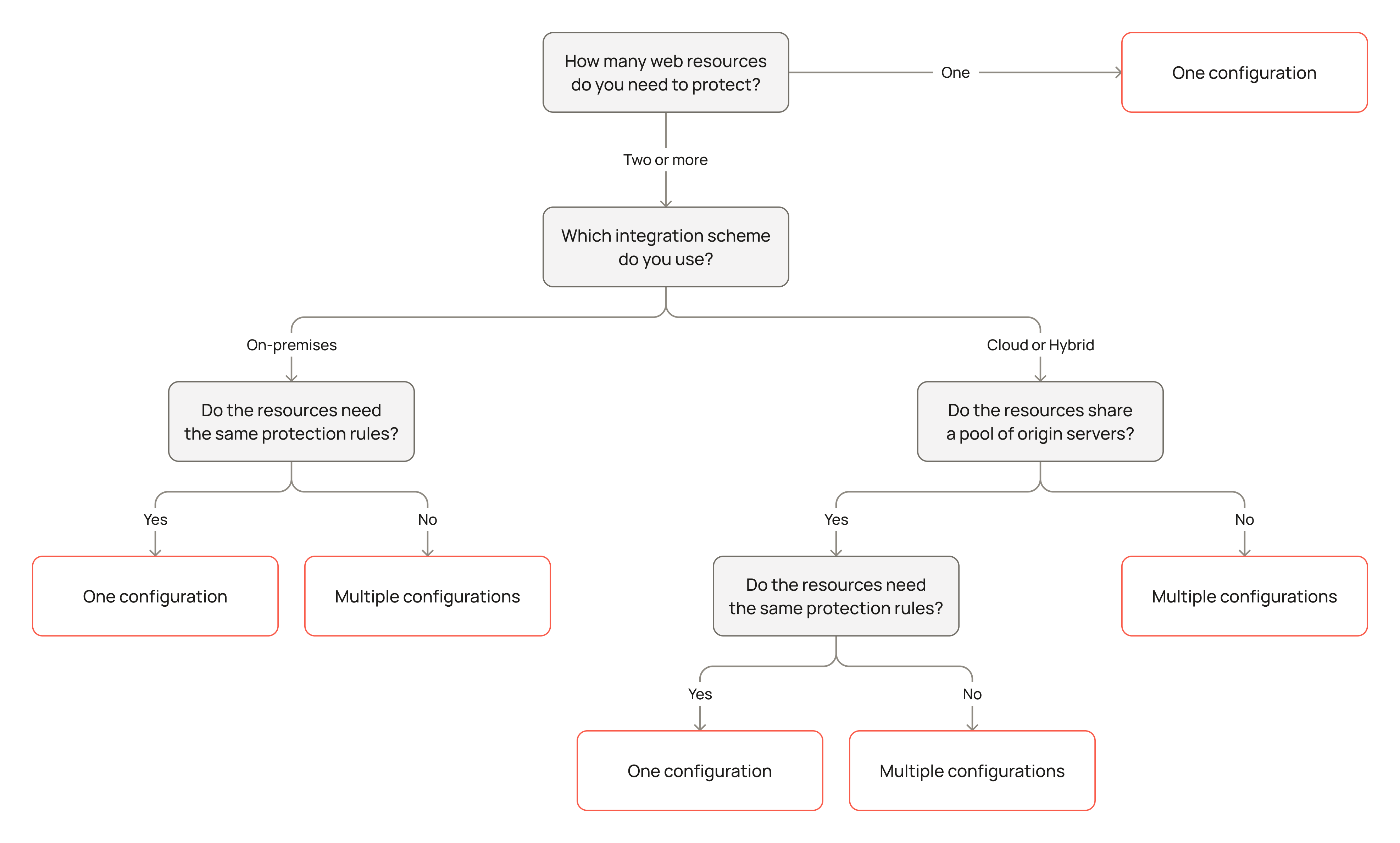
You can also find the right option in the text below.
One configuration
One configuration is enough in the following cases:
-
One web resource, with any integration option. All your traffic can be processed according to the same rules, so one configuration is enough.
-
Several web resources whose traffic can be processed according to the same protection rules, with the Module option. In this case, the configuration is responsible only for filtering, while you manage load balancing yourself. You do not need additional configurations.
-
Several web resources hosted on the same servers whose traffic can be processed according to the same protection rules, with the Proxy or Hybrid option. If different resources, such as a website and its mirrors, have a shared backend and identical protection settings, you can combine them into one configuration.
Multiple configurations
Use multiple configurations in the following cases:
-
Several web resources hosted on different servers, with the Proxy or Hybrid option. You need as many configurations as there are unique domain and origin server pairs, so traffic for each resource is sent only to its own backend and does not mix with other traffic.
-
Several web resources with different business logic, with any integration option. You need as many configurations as there are resources that must be fully isolated from one another.