How Digital Fraud Prevention Works
This article describes step by step how DFP interacts with your website and backend.
How It Works: A Quick Overview
-
You add the DFP JavaScript script to the required page of your website.
-
A user opens this page or performs an action on it that requires a check. You choose when the script runs.
-
The script collects client environment parameters.
-
The script sends the collected data to the DFP API.
-
DFP analyzes characteristics of the network interaction while the browser sends the request, for example TLS handshake data and L3/L4 network-layer data.
-
DFP performs a final analysis of all collected data and packages the result as JSON. It contains
user_id, the bot activity check result, whether the user has a VPN enabled, whether the request came from a hosting subnet or a regular subnet, and other parameters. View the full list of parameters. -
DFP encrypts the result and returns it to the browser.
-
The browser sends the encrypted response to your backend.
-
Your backend decrypts the response, checks the result, and applies your business logic.
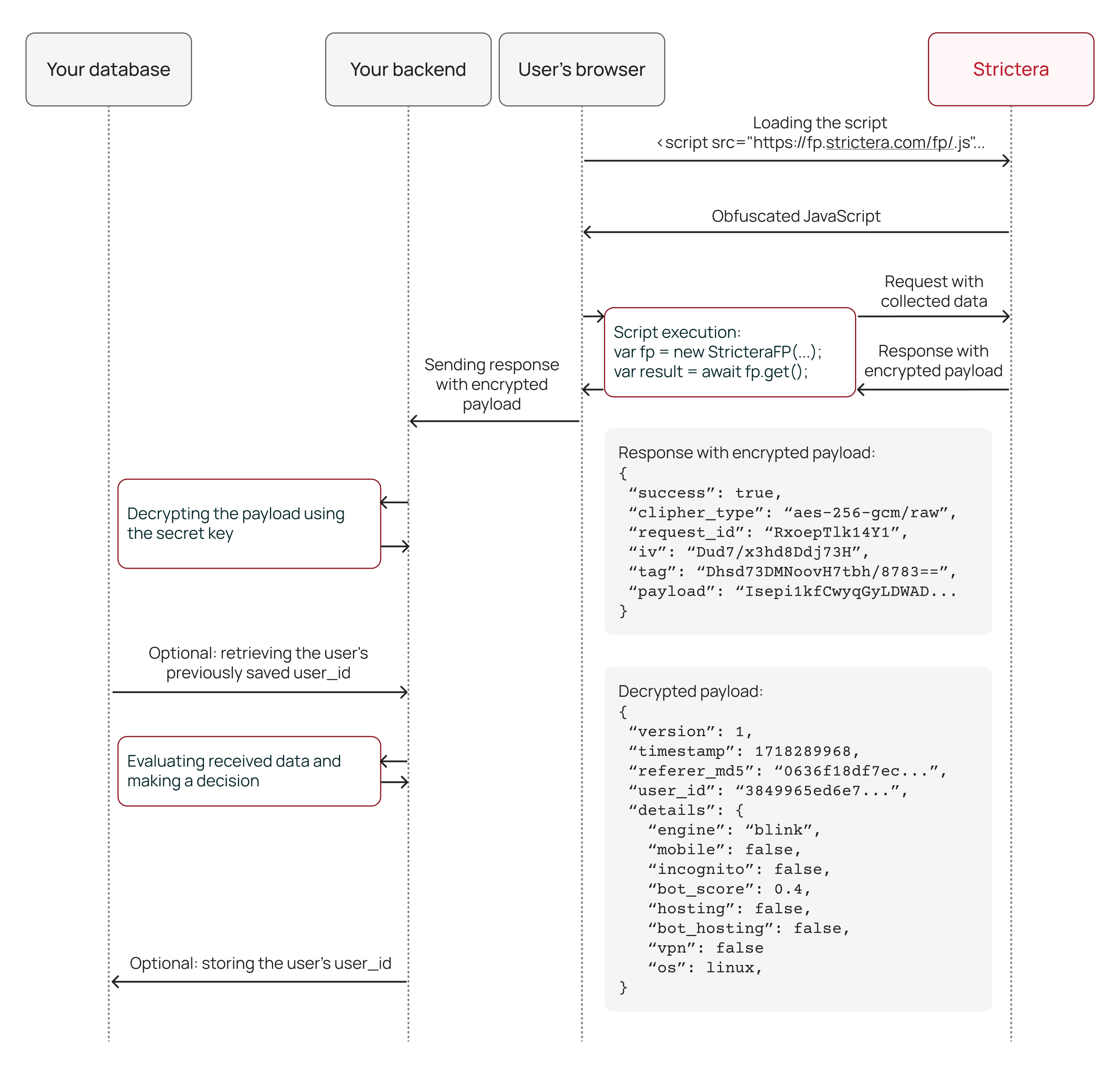
How It Works: A Detailed Overview
1. You add the script to your website
You add the DFP JavaScript library to a page where you need to check the client environment and the likelihood of bot activity.
For example, you can add the script to a sign-in page and check whether a user is signing in from a familiar environment.
2. The user opens the page
When the page opens, the browser loads the DFP JavaScript library.
|
We recommend configuring the integration so that client environment data collection begins as early as possible, for example when the page opens, and the data is sent to the DFP API at the moment of the target action, such as signing in, submitting a form, or confirming an operation. This gives you a faster DFP response and improves its accuracy. For details, see the integration guide. |
3. The script collects client environment data
The script collects parameters that help describe the user’s browser and device.
|
You can also pass your own data string to the script through the The second type of data you can pass is |
4. The script sends data to the DFP API and the network interaction is analyzed
After collecting data, the script sends a request to the DFP API in the Strictera infrastructure.
Inside the infrastructure, the request is proxied through Web DDoS & Bot Protection nodes. These nodes run software that can analyze request telemetry at the L3-L7 layers. The following data is collected there:
-
automation data;
-
TLS handshake information;
-
L3/L4 network-layer information;
-
information about how the browser sends data to the server.
This gives DFP a more complete picture of the request than analyzing browser data alone.
5. DFP creates user_id
DFP creates a fingerprint of the client environment and uses it to generate user_id, a persistent identifier of that environment.
Put simply, user_id is an ID that describes a browser-device pair. It remains stable even if a user changes device, browser, or network settings. For example, if the user:
-
enables a VPN;
-
updates the operating system;
-
enables incognito mode;
-
changes the time on their computer;
-
updates the browser version.
The ID stays the same because the main condition is met: the device and browser are unchanged.
If the user opens another browser or sends a request from another device, you will see a different ID. This is because every browser-device pair has its own unique ID.
6. DFP creates values for the other parameters
Based on the collected data, DFP creates values for the following fields:
-
bot_score: the likelihood that a bot sent the request; -
engine: the browser engine; -
os: the operating system; -
mobile: whether the request was sent from a mobile device; -
incognito: whether incognito mode is enabled; -
isp_active_subnet: whether the IP belongs to an active Internet service provider subnet used to connect private or corporate customers to the Internet; -
vpn: whether a VPN is in use; -
hosting: whether the request came from a hosting subnet or a regular subnet; -
bot_hosting: whether the request came from a hosting subnet from which we have detected bot activity or other suspicious activity; -
new_user: whether this client environment is visiting your resource for the first time; -
confidence_score: how confident DFP is that theuser_idwas identified correctly.
For a detailed description of these fields, see What DFP Response Fields Mean.
7. DFP encrypts the result
DFP encrypts the payload and returns the response to the browser. In addition to the payload, a successful response contains service fields for decryption and diagnostics:
-
cipher_type: the encryption algorithm; -
iv: the initialization vector; -
tag: the authentication tag; -
request_id: the request identifier, used if you need to contact support.
The browser receives the response.
The browser must not make a decision based on the DFP result because it is an untrusted environment. Decision-making logic must be implemented on your backend.
8. The browser sends the response to your backend
The script sends the encrypted DFP response to your backend.
9. Your backend decrypts the payload
Decryption uses the secret key you received from Strictera.
After decryption, the backend receives the payload fields in plain text.
10. Your backend checks timestamp
Your backend must be configured not to accept DFP responses that are more than a few seconds old. This important measure protects you from replay attacks. For details, see Use timestamp for Replay Attack Prevention.
If the DFP response is fresh, processing continues.
11. Your backend checks user_id and other fields
Your backend checks the payload fields: user_id, bot_score, engine, os, mobile, incognito, isp_active_subnet, vpn, hosting, bot_hosting, new_user, confidence_score, and custom_data.
It also compares new values with previous ones. For example, your database may store mappings between accounts and their related user_id values. This is useful when you need to assess whether a user is signing in from a familiar environment, which is not a risk factor, or a new one, which is a risk factor. In simplified form, this may look like this:
| user_id | user_account | last_seen |
|---|---|---|
U_101 |
account_A |
2026-05-28 |
U_102 |
account_A |
2026-05-28 |
U_203 |
account_B |
2026-05-27 |
12. Your backend applies business logic
The decision then depends on the rules you configure. For example:
-
the user comes from a familiar environment and has a low
bot_score: allow the action without an additional check; -
the user accesses a familiar account from a new environment: request additional verification;
-
a new environment passes the check: link the new
user_idto the user; -
one
user_idis linked to several accounts: use this as a multi-accounting signal; -
the request has a high
bot_scoreand comes from a hosting subnet from which we have detected bot activity or other suspicious activity: limit the action or send it for an additional check.
We have prepared several ready-to-use configuration scenarios that you can implement on your backend using DFP data:
13. Your backend stores the result for future requests
After processing, your backend stores user_id and values of other fields that are important for your scenarios in the database.
This is useful for future requests. For example, DFP will also return a user_id for a new request, and your backend can check whether it has seen this ID before, which user it was linked to, and what action to take.