Detect Stolen Cookies or Tokens
How to use DFP data to understand whether a user’s authentication cookie or token was stolen and prevent an attacker from signing in to the account.
The Problem We Solve
Usually, when a user signs in with a username and password, your service issues a cookie or token for automatic authentication. The next time, your backend lets the user in without additional checks based on this cookie or token. Attackers take advantage of this: they steal the cookie or token and sign in as the real owner.
DFP helps prevent this. It shows which environment the user signs in from. If an existing cookie or token is used in a new browser or on a new device, the data was likely stolen. It is better to ask the user to enter their username and password again.
How to Configure Stolen Cookie and Token Detection
On Your Backend
How the Scenario Works
Your database usually already stores a relationship between issued cookies or tokens and accounts. For example:
| Cookie or token | Account |
|---|---|
|
mira |
|
alex |
|
max |
Add an environment check to this logic. Each time a user authenticates, run DFP and receive user_id, the environment identifier. Store the relationship between the account and not only a cookie or token, but also user_id.
More about user_id
user_id is a persistent identifier of the client environment.
Put simply, it is an ID that describes a unique browser-device pair. The ID remains stable even when a user changes settings. For example, if the user:
-
enables a VPN;
-
opens an incognito window;
-
updates the operating system;
-
changes the time on their computer;
-
updates the browser version.
The ID stays the same because the device and browser are still the same.
If the user opens another browser or sends a request from a new device, you will see a new ID. This is because every browser-device pair has its own unique ID.
You can test this yourself: we have embedded the DFP widget directly on this page, and it shows your current User ID. Try opening the page from different environments and with different settings. You will see that it works exactly as described.
For example:
| Account | Cookie or token | user_id |
|---|---|---|
mira |
|
|
mira |
|
|
mira |
|
|
The backend sees which environments and credentials the user has used to sign in. If an existing token suddenly comes with a new user_id, this is suspicious. It is better to ask the user to enter their username and password again.
|
In addition to |
Preparation
Integrate DFP with your website by following the integration guide.
Backend Configuration
-
Decrypt the DFP response.
-
Check
timestamp. This is important for prevention of replay attacks:-
If the response is fresh, continue to the next step.
-
If the response is more than a few seconds old, reject the DFP result and do not perform automatic authentication with the cookie or token. The frontend must call DFP again, receive a fresh payload, and send it to the backend. If it cannot obtain a fresh payload, ask the user to sign in with their username and password.
-
-
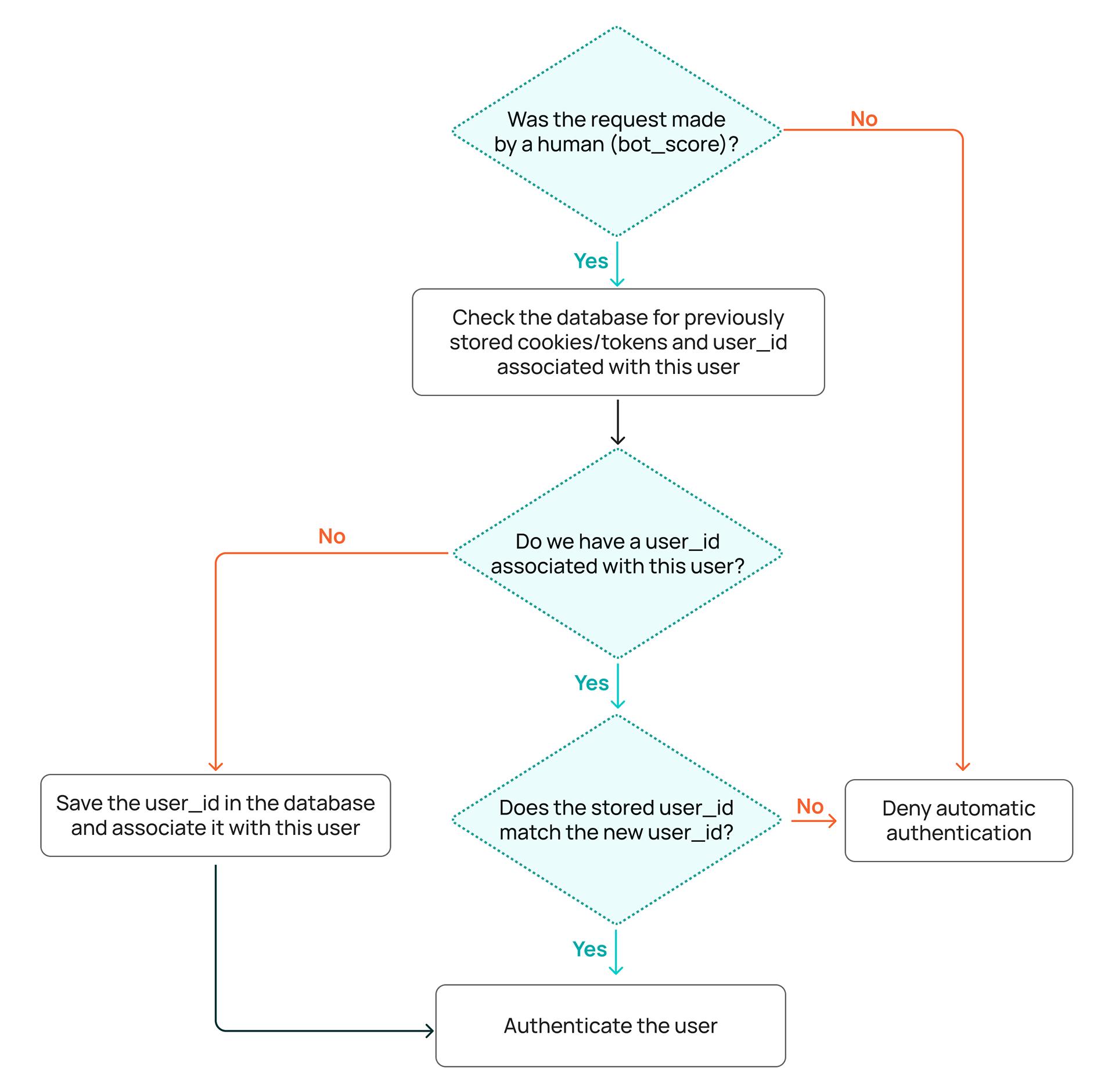
Check
bot_score:-
Below 0.4: no automation signals. Continue the check.
-
From 0.4: there is a risk that a bot is making the request. Deny automatic authentication and ask the user to enter their username and password again.
-
-
The user tries to sign in with their cookie or token. Check whether a
user_idis stored for this cookie or token:-
No: this is normal if you recently added DFP and the user has not signed in since then, so DFP has not checked them yet. Save the current
user_idin the database and allow the user. -
Yes: proceed to the next step.
-
-
Compare the previously stored
user_idwith the newuser_id:-
The values match: the user signs in from a familiar environment. Authenticate them.
-
The values do not match: the cookie or token was likely stolen and is now being used from another browser or device. Deny automatic authentication and ask the user to enter their username and password again. If they cannot sign in, it was an attacker. If they can, issue a new token and save a new
user_idfor it.
-
The decision logic as a flowchart:
On the Strictera Side
We can implement this logic for you.
We will store the relationship between your service’s cookies or tokens and user_id. If a user signs in with an existing cookie or token from a new environment, DFP sends you a signal that the data may have been stolen by an attacker.
We configure this mechanism individually on request. Our engineers will agree with you on how the check works, in what format we receive cookie or token data, and in what format we return the result.
Contact us to discuss and implement a solution for your scenario.